How I Turned Drone Footage into a Guided Real Estate Tour Using After Effects
Insight
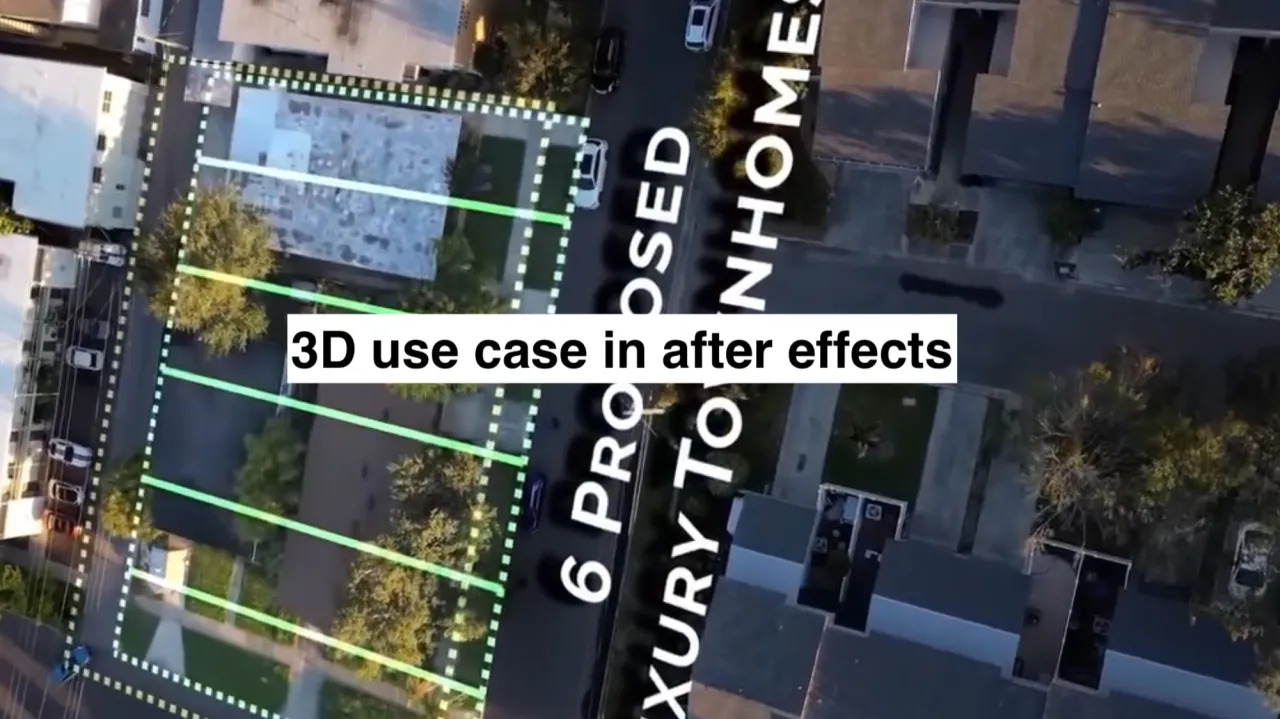
I was handed drone footage. The brief was simple: show the lot, show the size, show how far it is from places people care about. Downtown. Significant locations. The waterfront. No 3D models. No Google Earth composites. Just After Effects.
That’s where 3D space came in.
After Effects isn’t typically the first tool that comes to mind when thinking about spatial storytelling, but this was what I had. Its 3D layers, camera rigging, and light-based depth gives it a kind of quiet power. It lets you treat video footage not as a flat canvas, but as a world you can move through.
For this project, I mapped each lot directly onto the drone footage. Instead of layering graphics that just sat on top of the video, I placed them into the scene. Property lines hovered in accurate perspective. Labels floated in real scale. Arrows pointed outward from the lot and travelled through space to mark key destinations. Each element respected depth and parallax, tied to the angle of the camera and the curve of the shot.
The footage did the flying. The design did the guiding.
I used null objects as anchors for important landmarks. I calculated distances from the lot centre to nearby points of interest using simple pixel tracking combined with geographic references. Each path was visualised with a 3D stroke that moved organically with the drone. This gave viewers a clear sense of how close or far things really were, without needing to explain it in voiceover or add cluttered UI.
The footage did the flying. The design did the guiding.
The result felt more like a guided tour than an advertisement. Buyers could immediately understand how the space connected to the city around it. One client said it felt like watching a map come alive.
Real estate visuals often rely on saturated colour correction, stock icons, or repetitive pan-and-zoom tricks. This approach aimed for clarity and atmosphere instead. Everything was designed to enhance orientation. If something didn’t help viewers understand space, it was left out.
After Effects gave me that control. With 3D space activated, I wasn’t just compositing graphics; I was staging scenes. Each layer had its place, its own perspective, its own role in the story.
That story was about connection. A plot of land isn’t floating in a void. It’s stitched into a living place, tied to roads, people, and memory. 3D space gave me a way to show that, directly.
If you ever work on real estate video, I’d encourage you to look past templates and think in terms of perspective. Think about where the viewer is looking from. Think about what matters in the frame. And think about how 3D space, even in After Effects, can bring the invisible parts of a city to life.
How I Turned Drone Footage into a Guided Real Estate Tour Using After Effects
Insight
I was handed drone footage. The brief was simple: show the lot, show the size, show how far it is from places people care about. Downtown. Significant locations. The waterfront. No 3D models. No Google Earth composites. Just After Effects.
That’s where 3D space came in.
After Effects isn’t typically the first tool that comes to mind when thinking about spatial storytelling, but this was what I had. Its 3D layers, camera rigging, and light-based depth gives it a kind of quiet power. It lets you treat video footage not as a flat canvas, but as a world you can move through.
For this project, I mapped each lot directly onto the drone footage. Instead of layering graphics that just sat on top of the video, I placed them into the scene. Property lines hovered in accurate perspective. Labels floated in real scale. Arrows pointed outward from the lot and travelled through space to mark key destinations. Each element respected depth and parallax, tied to the angle of the camera and the curve of the shot.
The footage did the flying. The design did the guiding.
I used null objects as anchors for important landmarks. I calculated distances from the lot centre to nearby points of interest using simple pixel tracking combined with geographic references. Each path was visualised with a 3D stroke that moved organically with the drone. This gave viewers a clear sense of how close or far things really were, without needing to explain it in voiceover or add cluttered UI.
The footage did the flying. The design did the guiding.
The result felt more like a guided tour than an advertisement. Buyers could immediately understand how the space connected to the city around it. One client said it felt like watching a map come alive.
Real estate visuals often rely on saturated colour correction, stock icons, or repetitive pan-and-zoom tricks. This approach aimed for clarity and atmosphere instead. Everything was designed to enhance orientation. If something didn’t help viewers understand space, it was left out.
After Effects gave me that control. With 3D space activated, I wasn’t just compositing graphics; I was staging scenes. Each layer had its place, its own perspective, its own role in the story.
That story was about connection. A plot of land isn’t floating in a void. It’s stitched into a living place, tied to roads, people, and memory. 3D space gave me a way to show that, directly.
If you ever work on real estate video, I’d encourage you to look past templates and think in terms of perspective. Think about where the viewer is looking from. Think about what matters in the frame. And think about how 3D space, even in After Effects, can bring the invisible parts of a city to life.
How I Turned Drone Footage into a Guided Real Estate Tour Using After Effects
Insight
I was handed drone footage. The brief was simple: show the lot, show the size, show how far it is from places people care about. Downtown. Significant locations. The waterfront. No 3D models. No Google Earth composites. Just After Effects.
That’s where 3D space came in.
After Effects isn’t typically the first tool that comes to mind when thinking about spatial storytelling, but this was what I had. Its 3D layers, camera rigging, and light-based depth gives it a kind of quiet power. It lets you treat video footage not as a flat canvas, but as a world you can move through.
For this project, I mapped each lot directly onto the drone footage. Instead of layering graphics that just sat on top of the video, I placed them into the scene. Property lines hovered in accurate perspective. Labels floated in real scale. Arrows pointed outward from the lot and travelled through space to mark key destinations. Each element respected depth and parallax, tied to the angle of the camera and the curve of the shot.
The footage did the flying. The design did the guiding.
I used null objects as anchors for important landmarks. I calculated distances from the lot centre to nearby points of interest using simple pixel tracking combined with geographic references. Each path was visualised with a 3D stroke that moved organically with the drone. This gave viewers a clear sense of how close or far things really were, without needing to explain it in voiceover or add cluttered UI.
The footage did the flying. The design did the guiding.
The result felt more like a guided tour than an advertisement. Buyers could immediately understand how the space connected to the city around it. One client said it felt like watching a map come alive.
Real estate visuals often rely on saturated colour correction, stock icons, or repetitive pan-and-zoom tricks. This approach aimed for clarity and atmosphere instead. Everything was designed to enhance orientation. If something didn’t help viewers understand space, it was left out.
After Effects gave me that control. With 3D space activated, I wasn’t just compositing graphics; I was staging scenes. Each layer had its place, its own perspective, its own role in the story.
That story was about connection. A plot of land isn’t floating in a void. It’s stitched into a living place, tied to roads, people, and memory. 3D space gave me a way to show that, directly.
If you ever work on real estate video, I’d encourage you to look past templates and think in terms of perspective. Think about where the viewer is looking from. Think about what matters in the frame. And think about how 3D space, even in After Effects, can bring the invisible parts of a city to life.