I Built a Pay Calculator From Scratch As a Beginner. Here's How It Went
Resources
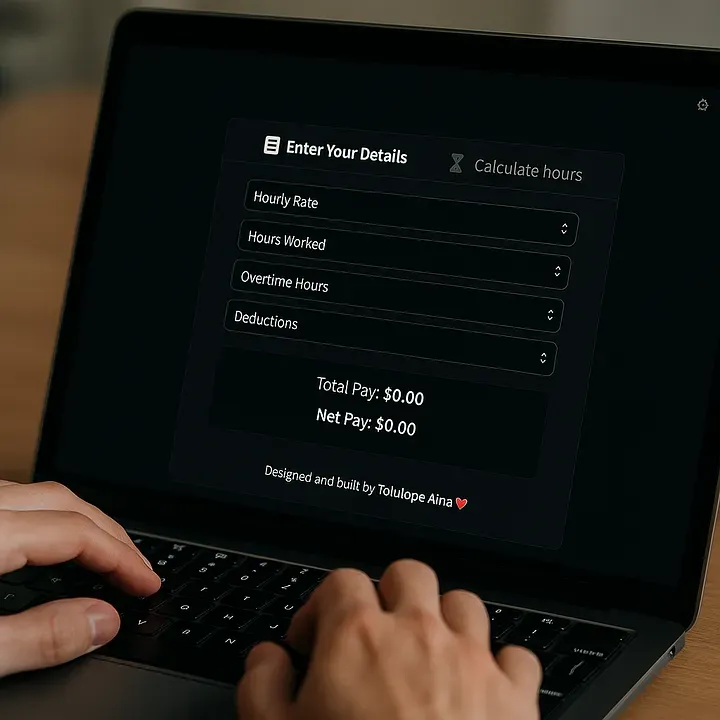
If you’ve ever been paid by the hour, you know how tricky it can be to figure out what your paycheck will actually look like. Factor in overtime, daily hours, and deductions and suddenly, you’re breaking out a calculator and a headache.
That’s exactly why I built HourlyPayCalculator.online a simple, clean one-page web app that helps people calculate their pay quickly. It’s fully responsive, runs entirely in the browser, and doesn’t ask for any personal data. Just plug in your hours and rate, and boom, you get your take-home pay.
The best part? I built it all using just HTML, CSS, and plain JavaScript, no backend, no frameworks, no fluff.

Why I Chose This Project
I wanted a small but meaningful challenge, something I could design, code, and deploy without getting overwhelmed. There are tons of pay calculators online, but most of them are outdated, clunky, or stuffed with ads. I saw a clear opportunity to build something better, both for users and for my own learning.
From Sketch to Site
I started by mapping out the core features:
• Input fields for hourly rate, daily hours (Monday to Sunday), and deductions
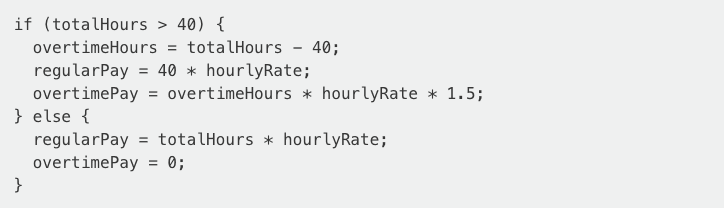
• Live calculation of total pay and overtime pay (if you go over 40 hours)
• A clean layout that adapts to desktop and mobile
No backend meant I had to be smart about data handling; everything happens in the browser. JavaScript tracks user input, calculates totals in real time, and updates the DOM on the fly.
The overtime logic is simple but effective:
Then it subtracts any deductions and displays the final result immediately.
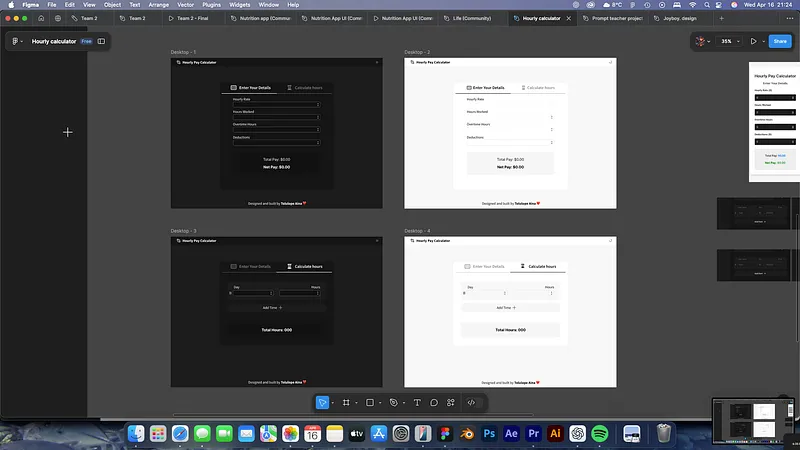
Design First, Code Second
I wanted the app to feel intuitive. So I went for a desktop-style layout first, centred on the page with clear headers and input fields. I made sure everything was accessible on mobile too, using percentage widths and flexbox.
The colour palette is minimal: light backgrounds, dark text, and bold fonts for key info. No distractions. Just the numbers.
Deploying the App
Once it all worked locally, I deployed it using GitHub Pages, one of the easiest ways to get a static site online. The whole process took less than 10 minutes. And because it’s all client-side, there’s no server to worry about.
Now it’s live at: hourlypaycalculator.online
What I Learned
• HTML & CSS: Structuring for clarity and responsiveness
• JavaScript: Managing dynamic input and live calculations
• UX: Prioritising simplicity and speed for real users
• Deployment: Hosting and domain setup with Netlify
This little project gave me more hands-on experience than any tutorial. And it’s genuinely useful, I even use it myself.
Want to Try It Out?
You can test it here: Final website
You can also check out a visualisation of my process in Behance here: Behance Project
I’d love feedback, feature suggestions, or bug reports.
And if you’re just starting, pick a small, real-world problem and build a solution. You’ll be surprised how far that can take you.
I Built a Pay Calculator From Scratch As a Beginner. Here's How It Went
Resources
If you’ve ever been paid by the hour, you know how tricky it can be to figure out what your paycheck will actually look like. Factor in overtime, daily hours, and deductions and suddenly, you’re breaking out a calculator and a headache.
That’s exactly why I built HourlyPayCalculator.online a simple, clean one-page web app that helps people calculate their pay quickly. It’s fully responsive, runs entirely in the browser, and doesn’t ask for any personal data. Just plug in your hours and rate, and boom, you get your take-home pay.
The best part? I built it all using just HTML, CSS, and plain JavaScript, no backend, no frameworks, no fluff.
Why I Chose This Project
I wanted a small but meaningful challenge, something I could design, code, and deploy without getting overwhelmed. There are tons of pay calculators online, but most of them are outdated, clunky, or stuffed with ads. I saw a clear opportunity to build something better, both for users and for my own learning.
From Sketch to Site
I started by mapping out the core features:
• Input fields for hourly rate, daily hours (Monday to Sunday), and deductions
• Live calculation of total pay and overtime pay (if you go over 40 hours)
• A clean layout that adapts to desktop and mobile
No backend meant I had to be smart about data handling; everything happens in the browser. JavaScript tracks user input, calculates totals in real time, and updates the DOM on the fly.
The overtime logic is simple but effective:
Then it subtracts any deductions and displays the final result immediately.
Design First, Code Second
I wanted the app to feel intuitive. So I went for a desktop-style layout first, centred on the page with clear headers and input fields. I made sure everything was accessible on mobile too, using percentage widths and flexbox.
The colour palette is minimal: light backgrounds, dark text, and bold fonts for key info. No distractions. Just the numbers.
Deploying the App
Once it all worked locally, I deployed it using GitHub Pages, one of the easiest ways to get a static site online. The whole process took less than 10 minutes. And because it’s all client-side, there’s no server to worry about.
Now it’s live at: hourlypaycalculator.online
What I Learned
• HTML & CSS: Structuring for clarity and responsiveness
• JavaScript: Managing dynamic input and live calculations
• UX: Prioritising simplicity and speed for real users
• Deployment: Hosting and domain setup with Netlify
This little project gave me more hands-on experience than any tutorial. And it’s genuinely useful, I even use it myself.
Want to Try It Out?
You can test it here: Final website
You can also check out a visualisation of my process in Behance here: Behance Project
I’d love feedback, feature suggestions, or bug reports.
And if you’re just starting, pick a small, real-world problem and build a solution. You’ll be surprised how far that can take you.
I Built a Pay Calculator From Scratch As a Beginner. Here's How It Went
Resources
If you’ve ever been paid by the hour, you know how tricky it can be to figure out what your paycheck will actually look like. Factor in overtime, daily hours, and deductions and suddenly, you’re breaking out a calculator and a headache.
That’s exactly why I built HourlyPayCalculator.online a simple, clean one-page web app that helps people calculate their pay quickly. It’s fully responsive, runs entirely in the browser, and doesn’t ask for any personal data. Just plug in your hours and rate, and boom, you get your take-home pay.
The best part? I built it all using just HTML, CSS, and plain JavaScript, no backend, no frameworks, no fluff.
Why I Chose This Project
I wanted a small but meaningful challenge, something I could design, code, and deploy without getting overwhelmed. There are tons of pay calculators online, but most of them are outdated, clunky, or stuffed with ads. I saw a clear opportunity to build something better, both for users and for my own learning.
From Sketch to Site
I started by mapping out the core features:
• Input fields for hourly rate, daily hours (Monday to Sunday), and deductions
• Live calculation of total pay and overtime pay (if you go over 40 hours)
• A clean layout that adapts to desktop and mobile
No backend meant I had to be smart about data handling; everything happens in the browser. JavaScript tracks user input, calculates totals in real time, and updates the DOM on the fly.
The overtime logic is simple but effective:
Then it subtracts any deductions and displays the final result immediately.
Design First, Code Second
I wanted the app to feel intuitive. So I went for a desktop-style layout first, centred on the page with clear headers and input fields. I made sure everything was accessible on mobile too, using percentage widths and flexbox.
The colour palette is minimal: light backgrounds, dark text, and bold fonts for key info. No distractions. Just the numbers.
Deploying the App
Once it all worked locally, I deployed it using GitHub Pages, one of the easiest ways to get a static site online. The whole process took less than 10 minutes. And because it’s all client-side, there’s no server to worry about.
Now it’s live at: hourlypaycalculator.online
What I Learned
• HTML & CSS: Structuring for clarity and responsiveness
• JavaScript: Managing dynamic input and live calculations
• UX: Prioritising simplicity and speed for real users
• Deployment: Hosting and domain setup with Netlify
This little project gave me more hands-on experience than any tutorial. And it’s genuinely useful, I even use it myself.
Want to Try It Out?
You can test it here: Final website
You can also check out a visualisation of my process in Behance here: Behance Project
I’d love feedback, feature suggestions, or bug reports.
And if you’re just starting, pick a small, real-world problem and build a solution. You’ll be surprised how far that can take you.